
66% of Canadians pay for subscriptions they forgot they had.
Source: Hardbacon Subscription Survey, March 2024 (n=516)
The average Canadian has 8 active subscriptions but thinks they only have 4. SubSavvy finds the ones you've lost track of, in 60 seconds. Built for Canadian banks, no login required.
Scan My Statement FreePDF or CSV from any major Canadian bank. File deleted immediately after scan.
- No bank login required
- Built for Canadian banks
- File deleted after scanning
- $9.99/mo
AMZ*Prime Video CA
Streaming
- $24.99/mo
FITNESS PLUS *MTL
Fitness
- $54.99/mo
ADOBE *CRTV CLOUD
Productivity
- $18.42/mo
NYT DIGITAL
News
You’re probably paying for something you don’t use right now.
- 01
Most people can name their streaming services. Almost nobody can name everything that renews automatically.
- 02
Free trials that silently convert. Annual renewals you didn’t expect. Small monthly charges you stopped noticing three years ago.
- 03
The answers are in your bank statement, but who has time to read 30 pages of transactions line by line?
How it works
Upload your statement






Download a PDF or CSV from your online banking: RBC, TD, BMO, Scotia, CIBC, or Desjardins. Drop it into SubSavvy. No bank login needed.
We find every recurring charge
Detected Subscriptions
- AMZ*Prime Video CA$9.99/mo
- FITNESS PLUS *MTL$24.99/mo
- ADOBE *CRTV CLOUD$54.99/mo
SubSavvy analyzes your transactions and identifies subscriptions, memberships, and free trials, even the ones you’ve been ignoring for months. Results in under 60 seconds.
Cancel what you don’t need
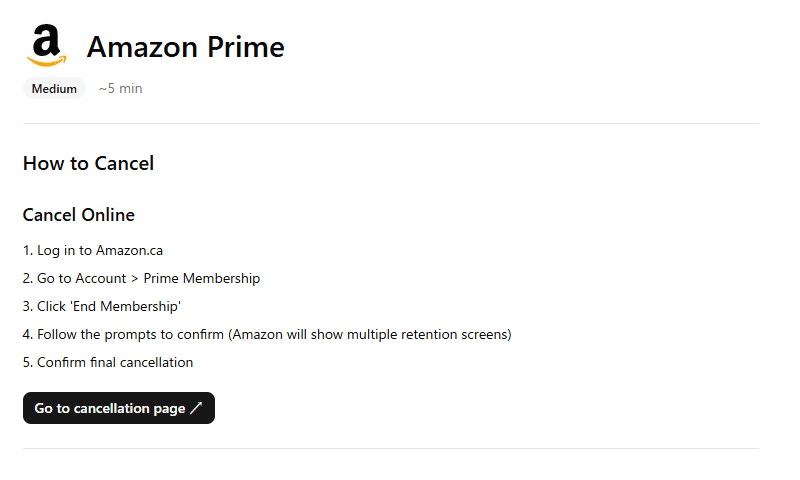
Get step-by-step cancel guides for 70+ Canadian services. Set billing reminders so annual charges never surprise you again.
Your bank data never leaves the scan.
SubSavvy is designed so we handle as little of your data as possible, and none of it permanently.
We never access your bank
You download the file yourself from online banking. SubSavvy never sees your login credentials and cannot initiate transactions.
File deleted after scanning
Your uploaded file is processed to extract transaction text, then permanently deleted. We do not store bank statement files.
No account required
Your free scan works instantly, with no email or signup required. Create an account only if you want billing reminders.
Encrypted & secure
All data is transmitted over HTTPS. Your statement is processed in memory and never written to permanent storage.
Pricing
Try the free scan first. You'll see your subscriptions before deciding to pay.
Free
$0
No credit card
See if SubSavvy works for you. No commitment.
- See your top subscriptions
- Basic scan results
- Results expire in 24 hours
Full Report
$4.99
One-time, plus tax. Not a subscription
For one-time cleanup. Find what you forgot, get cancel guides, done.
- All subscriptions revealed
- Cancel guides for 70+ services
- Cheaper alternatives
- No billing reminders
Pro
For ongoing tracking
$7.99
/month plus tax, or $79/year (save 17%)
For people with annual subscriptions and free trials to track.
- All subscriptions revealed
- Cancel guides for 70+ services
- Cheaper alternatives
- Billing reminders before renewal
- Trial trap detection
- Upload up to 6 statements
See your results before you pay anything.
Frequently Asked Questions
Is it safe to upload my bank statement?
Yes. Your file is processed only to extract transaction text, then immediately deleted. We never store your raw bank data. Free scan results are automatically deleted after 24 hours, whether or not you are signed in.
Which banks are supported?
We support PDF and CSV exports from RBC, TD, BMO, Scotiabank, CIBC, Desjardins, and most standard bank CSV formats.
Does SubSavvy work with French bank statements from Quebec banks?
Yes. SubSavvy fully supports French-language statements from Desjardins, National Bank, and other Quebec institutions. The interface is also available in French.
Do I need to create an account?
No account is required for a free scan. To set billing reminders, you need an account and a Pro subscription (Monthly or Yearly).
What if I have a joint account?
SubSavvy analyzes the statement you upload, regardless of whose name is on the account. We recommend reviewing the results with your account co-holder, since some recurring charges may be theirs.
How accurate is the detection for small or unusual subscriptions?
SubSavvy uses pattern matching against 70+ known Canadian services, plus AI analysis for unusual charges. Accuracy is highest for common subscriptions (streaming, telecom, software) and lower for niche or one-off recurring charges. You can flag false positives in your dashboard.
What happens to my data after scanning?
Your uploaded file is permanently deleted immediately after text extraction. Free scan results are automatically deleted after 24 hours, whether or not you are signed in. Paid results are stored until you delete your account, which you can do at any time from Account Settings. We never store raw bank statement files.
Can SubSavvy access my bank account?
No. SubSavvy never connects to your bank. You manually download a statement file from your bank's website and upload it here. We cannot see your passwords, make transactions, or access your account in any way.
Find out what you’re really paying for.
One upload, under a minute, free to start.
Find My Forgotten Subscriptions